
Giada can host VST3 and LV2 plug-ins thanks to the JUCE framework. To use them, just follow these three basic steps:
scan the plug-in directory, that is, the folder where your plug-ins are stored. You only need to do this once, or whenever you add or install new plug-ins. This process is described in the Configuration chapter;
browse the available plug-ins by clicking the FX button  on each channel or next to the main input/output channels;
select the desired plug-in and add it to the stack.
The FX button opens the list of plug-ins currently in use. This is where you add or remove plug-ins from channels and the main input/output. Wherever it appears, clicking it opens the plug-in stack window.
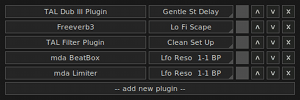
Each line corresponds to one plug-in. Click the name of the effect to open the plug-in editor. By default, Giada will try to display the plug-in's graphical interface; if the plug-in does not provide one, another window will show a list of available parameters that can be adjusted with horizontal sliders.
The drop-down menu on the right lists the presets (also known as programs). The check button  enables or disables the plug-in, while the up/down buttons
  move the plug-in within the stack. Finally, the remove button
  removes the plug-in from the stack. To add a new plug-in, click the button at the end of the stack (add new plug-in).
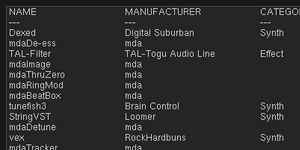
This window appears when you need to add a new plug-in to a stack by clicking the add new plug-in button mentioned above.
It shows a sorted list of all plug-ins found on your system after the scan, together with useful information such as type, manufacturer, category, and more.
To add a plug-in to the stack, select it from the list and press enter or click the add button.
You can load an unlimited number of plug-ins in Giada, but keep in mind that they may put a heavy load on your CPU and compromise live performance.
Plug-ins must run in compatible environments. For example, a macOS plug-in cannot be loaded in the Windows version of Giada, and vice versa. Plug-ins also require binary compatibility with the host: you cannot load a 32-bit plug-in in a 64-bit version of Giada, or vice versa.