

A MIDI channel contains MIDI events. Because it is strictly tied to the sequencer, you cannot trigger a MIDI channel manually as you would a sample channel. The main sequencer must be running in order to play a MIDI channel.
Clicking the main button  lets you edit MIDI events and perform additional operations. You can add a new MIDI channel by right-clicking on each column in the main window.
A MIDI channel is made up of several components. From left to right:
 Play button — starts and stops the channel;
 Arm button — arms the channel for recording;
Main button — shows the channel name and gives access to many operations. More information is provided in the paragraph below;
 Mute button — mutes the channel;
 Solo button — enables solo mode. Only this channel will be audible;
 FX button — displays the plug-ins window;
 Volume dial — controls the channel volume.
Clicking a MIDI channel's main button opens a pop-up menu with several available options:
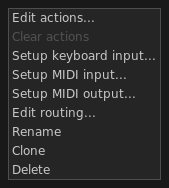
Edit actions — opens the Action Editor;
Clear actions — deletes all recorded actions from this channel;
Set keyboard input — binds keyboard keys to the channel;
Setup MIDI input — binds MIDI events to the channel. More information can be found in the MIDI input management chapter;
Setup MIDI output — enables MIDI output from this channel. More information can be found in the MIDI output management chapter;
Edit routing — lets you adjust input and output properties such as panning and volume;
Rename — changes the channel name;
Clone — adds a new channel by creating a full copy of the current one;
Delete — removes the channel from the column. All MIDI actions will be deleted as well.
 Off — the channel is stopped;
 Wait/ending (blinking) — the channel is waiting for the first beat to start or is about to stop;
Play (fixed) — the channel is active and playing.
MIDI channels can be played by clicking the channel play button
or by pressing the corresponding keyboard or MIDI button, if one is bound:
| event | result |
|---|---|
| click on play button | wait, then start or stop on the next first beat |
| shift + click on play button | immediate stop |
| click on mute button | mute |